
Applications of ML in automation
Software automation means using computers to handle tasks that would otherwise need people to do them. In modern systems, automation doesn’t just follow fixed “if-this-then-that” rules, as it can also learn and adapt through machine learning (ML).
Syllabus alignment
This lesson supports the NSW Software Engineering Stage 6 syllabus:
-
Software automation / Algorithms in machine learning
- Investigate how machine learning (ML) supports automation through the use of DevOps, robotic process automation (RPA) and business process automation (BPA).
Applications of ML in industry
Machine learning helps automation in three main areas you’ll meet across industry, and in this course:
- DevOps automation Keeps the software-delivery process running smoothly. ML models can spot unusual build errors, predict which tests are most likely to fail, and flag risky code changes before they cause problems.
- Robotic process automation (RPA) Handles repetitive computer work such as entering data or copying files. ML enables RPA to handle messy or unstructured inputs, such as reading text from scanned receipts or automatically classifying emails.
- Business process automation (BPA) Connects whole workflows across a business, such as booking systems or order processing. ML can prioritise tasks, predict demand, or route requests to the right person faster and more accurately.
Together, these examples show how ML adds “intelligence” to automation by helping systems recognise patterns, make decisions, and improve over time instead of just repeating instructions.
Comparing DevOps, RPA, BPA and MLOps
Explore the interactive below to see how DevOps, RPA, BPA, and MLOps each use ML in different ways. Work through the steps to compare what’s automated, how ML improves it, and where humans still stay in control.
DevOps Automation
Automating the steps that get new software or web content online. In this example, we see an example of DevOps automation in getting changes to a cafe's menu online quickly and hassle free.
STEP 1
Automate build and verificationThe café owner edits the menu file on a laptop, and the automatic DevOps setup notices the change straight away so nothing waits for manual uploads.
- Save the menu text file to trigger the automatic process.
- Commit the updated specials so the system records the change.
STEP 2
Gate releases with observabilityDevOps scripts automatically check the menu update for mistakes before anything goes live.
- Run automated tests to make sure prices and headings follow the template.
- Catch missing dollar signs or blank sections before customers see them.
STEP 3
Close the feedback loopThe fresh menu is uploaded to the live site so customers always see today’s specials without waiting for the owner to log in and copy text around.
- Push the checked menu straight to the web server.
- Refresh the site automatically so mobile visitors see the new dishes.
STEP 4
Optional ML polishA light machine learning check spots spelling or layout issues before the menu publishes.
- Highlight suspicious spelling for the owner to double-check quickly.
- Flag odd formatting so the menu stays easy to read on phones.
Robotic process automation (RPA)
Use a rule-based digital assistant that repeats simple computer tasks so daily receipt jobs stay accurate without heaps of manual typing.
STEP 1
Capture the manual workflowA receipt-processing bot watches a shared folder for new PDF receipts so it can start the automated routine as soon as one arrives.
- Monitor the receipts folder in the background.
- Log each new file so nothing is missed.
STEP 2
Configure and test the botThe bot reads each receipt using OCR so totals and dates become usable data without someone copying it by hand.
- Read receipts with OCR and pull out key details.
- Check that amounts, dates, and vendors make sense.
STEP 3
Monitor production runsIt adds the numbers to a spreadsheet, sorts items into tax categories, and keeps a running total so reports stay organised automatically.
- Sort each item into GST, non‑GST, or other categories.
- Update the spreadsheet and sum the totals automatically.
STEP 4
Optional ML assistMachine learning can spot messy or faded text, give a low‑confidence warning, and flag receipts for a person to double‑check so errors are caught early.
- Highlight receipts the bot is unsure about.
- Send uncertain items to a human for a quick review.
Business process automation (BPA)
Automating an entire process that connects several systems together keeps bookings flowing smoothly from email inbox to staff roster.
STEP 1
Map stakeholders and systemsA customer sends a booking email, and the BPA starts the automated routine so the inbox, calendar, and roster stay in sync without manual copying.
- Collect booking details from the email automatically.
- Trigger the background task as soon as the message arrives.
STEP 2
Design orchestrated flowsThe system reads the email and creates a calendar event so appointments appear in the right spot straight away.
- Add the booking straight to the calendar.
- Include the person, location, and appointment notes.
STEP 3
Govern and iterate the processA confirmation goes back to the customer while the staff timetable updates so everyone knows the daily plan without extra emails.
- Send a confirmation email with the agreed time.
- Update the staff roster automatically so the day is planned.
STEP 4
Optional ML assistMachine learning can predict busy times or spot booking clashes, suggesting new slots before things get overloaded.
- Forecast peak hours so extra staff can be rostered.
- Flag conflicting bookings so a person can reschedule.
MLOps
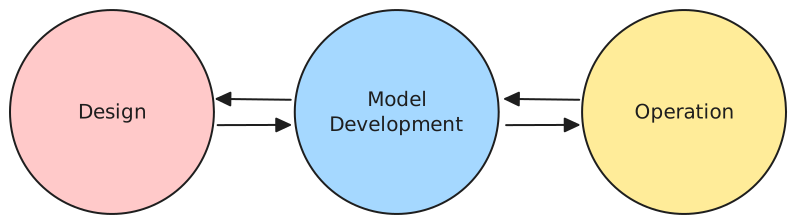
MLOps (Machine Learning Operations) is the automated process of designing, training and deploying machine learning models. It extends DevOps principles to include the creation and maintenance of ML systems so teams can develop, deploy and monitor models reliably and efficiently.
STEP 1
Design the ML solutionPlan how the model will address a business or operational problem and define what success looks like.
- Define the business problem and reframe it as an ML task.
- Set measurable success criteria and identify data sources.
STEP 2
Model developmentPrepare data and build the model using a reproducible workflow.
- Data wrangling and feature engineering to help the model learn.
- Train, test and validate the model for accuracy and reliability.
STEP 3
OperationsDeploy the model and keep it healthy in production as data and conditions change.
- Deploy to a production environment and support day‑to‑day use.
- Monitor performance, detect drift and retrain when needed.
MLOps is both technical and cultural: automation, collaboration and accountability ensure ML becomes a dependable part of software systems rather than an isolated experiment.
Key terms
- DevOps A professional practice that integrates software development (Dev) and IT operations (Ops) to shorten the software-delivery cycle. It uses automation to build, test and release software more efficiently.
- DevOps automation Automating the processes within DevOps—such as continuous integration, deployment and monitoring—so that software can be developed and released faster and more reliably.
- Robotic process automation (RPA) Software “robots” that perform routine digital tasks like data entry or file transfers. RPA tools mimic human actions on computers, freeing people from repetitive work.
- Business process automation (BPA) Using software to coordinate entire workflows across departments, such as order fulfilment or scheduling. BPA connects systems together to improve accuracy and efficiency at scale.
- MLOps (Machine Learning Operations) An approach that combines ML development with DevOps principles. MLOps automates the full ML lifecycle—designing, training, deploying and maintaining models—so that they can run reliably in production systems.
- Model training The process of teaching a machine learning model using example data so that it can recognise patterns or make predictions.
- Model deployment Making a trained machine learning model available for real use—often as part of a larger software system or service.
- Model monitoring The ongoing evaluation of a deployed ML model to check its accuracy, detect drift (changes in data patterns) and trigger retraining if needed.
- Feature engineering Selecting or creating the data attributes (features) that help a machine learning model learn more effectively.
- Data wrangling Cleaning and preparing raw data for use in training or analysis. This includes handling missing values, normalising formats and removing errors.
- Continuous integration / continuous delivery (CI/CD) Practices within DevOps where code changes are automatically tested and deployed, ensuring that software remains stable and up to date.